Document Domain

Every few years I run into an issue with JavaScript-based rich text editors and spellcheckers when they spawn pop-ups. The pop-ups open but don’t function.

If I open my Firebug console in the pop-up, I see something like:

Permission denied for <http://assets2.mysitedomain.com> (document.domain has not been set) to get property Window.tinymce from <http://www.mysitedomain.com&gt; (document.domain has not been set).

Chrome’s console, shows a similar error:

Unsafe JavaScript attempt to access frame with URL http://www.mysitedomain.com/mypage from frame with URL http://assets2.mysitedomain.com/javascripts/lib/tiny_mce/themes/advanced/source_editor.htm. Domains, protocols and ports must match.

In this case, TinyMCE‘s HTML plugin is running-up against JavaScript’s same origin policy because I’m serving assets (and therefore TinyMCE pop-ups) from a different fully-qualified domain name than the page TinyMCE is being embedded in. When not explicitly set, my site’s pages will default to something like www.mysitedomain.com and TinyMCE’s document domain will default to assets2.mysitedomain.com.

The simple fix is to bump up the document domain on my site’s pages to just mysitedomain.com. I do this in my global JavaScript file. I do the same thing to TinyMCE’s tiny_mce_popup.js file.

    document.domain = 'mysitedomain.com';

(You might also know that cookies need a similar bump when trying to read and write to them across subdomains.)

Although this works, there is a problem for those developing locally: there’s a good chance they’re not developing at mysitedomain.com but something like localhost. A page at localhost certainly isn’t allowed to claim its document domain is mysitedomain.com.

To handle both cases, we can instead set the document domain smartly, by putting this in both our global JavaScript file and in tiny_mce_popup.js:

    document.domain = /(\w+)(.\w+)?$/.exec(location.hostname)[0];
Fandango and Facebook Just Violated My Privacy

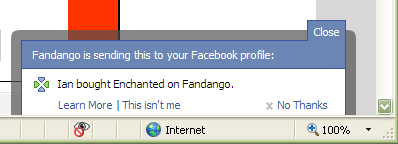
I just bought tickets from Fandango to see a movie with my girlfriend later this week. On the order confirmation screen, I noticed a Facebook-looking message peek its head and then quickly disappear. I whipped-out one of my clever hacking tools and made it appear again:

Fandango Publishing Facebook Story

Yes, I see the “No Thanks” link, but the whole dialog was visible for no more than two seconds. Definitely not enough time for me to read it, process what was going on, and act appropriately.

Instead of defaulting to publishing a story in my Facebook profile, Fandango should default to asking me if it can do such a thing and wait for an explicit confirmation either way. After confirming, then maybe it could play this trick again the next time I buy a ticket without me wondering what just happened.

I’m afraid there are going to be more grievous misuses to come.

Update: this new Facebook feature has been getting a lot of press and backlash. So much so that Facebook has now changed the design from opt-out to opt-in…sort of. See my Google Reader Shared Items (via the right-hand navigation) to follow the story.

Analogies of a Parking Violation, Part One: Security Enforcement

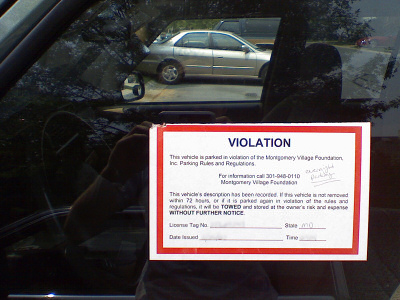
A few days ago I couldn’t find my car. After five minutes of pressing the panic button on my keychain, I realized that I accidentally left it at the community pool behind my house. My homeowner’s association placed a large, 5.5×4.25″ sticker on one of its windows, informing me that I had broken a community rule by leaving it there overnight and that I had 72 hours to move it. Exhibit A:

Parking Violation

The pool’s parking lot never fills up during the times that I park in it and it only has more spaces at night when people are not swimming. Regardless, I implicitly agreed to not leave it there overnight when I bought my house, and I broke that agreement. I deserved the sticker.

As I moved my vehicle from the pool parking lot to a space in front of my house, I noticed four vehicles parked illegally in front of three clearly-visible no-parking signs. The signs are there because of a fire hydrant and a crosswalk for pedestrians. None of the vehicles had stickers on them.

In my year of living in the neighborhood, we have not had any fires; however, I have seen two people and a dog almost get clobbered by other drivers because illegally-parked vehicles were obstructing the view of the crosswalk and those trying to cross it.

If you have to choose between protecting a nearly-empty pool parking lot and a fire hydrant and busy crosswalk, you protect the fire hydrant and crosswalk, for obvious reasons. There is real danger in an inaccessible fire hydrant and playing chicken with pedestrians.

You would not believe the hours I have wasted arguing with other software engineers, security engineers, and server administrators about non-existent security issues in my software. Numerous individuals have insisted that HTTP GET query strings should never be used because users can change data values before sending them to the server. They conclude by stating that HTTP POST is “more secure.” I quickly disprove these statements by demonstrating how to muck with POST data using a local web proxy and help them understand when to use GET and when to use POST. (There are times when you should use POST over GET, but not for security’s sake.)

I have also been directed in the past to store database connection or service account credential information in the Windows registry instead of a configuration file. Access Control Lists (ACL)–the technology that restricts access to things in Windows–sees both the registry and folders as logical containers and treats them the exact same way. There is no security difference between the two when they are protected by the same ACLs.

While these individuals were distracted by these non-security “issues,” they were simultaneously overlooking real security vulnerabilities: publicly-accessible application log files and database build scripts, weak database usernames and passwords, and inconsistent Access Control Matrices. They were focused on what appeared to be insecure when, in fact, they were missing what truly was insecure. In just about every case, the misapplication of software security was the result of not understanding why they thought things were insecure. They didn’t really understand what they were looking at.

To ensure that you and your colleagues apply your energy and acumen to that which truly is a security issue, seek to be educated by Bruce Schneir. He’s the expert on the topic and has written wonderful material on it. In particular, I recommend:

There is a huge difference between that which appears to be a security risk and that which is a security risk: one is imagined the other is real. We should all focus on the latter.